
Why Most Google Ads for Small Business Campaigns Fail
Every day, thousands of small business owners across the US log into their bank accounts, look at their marketing spend, and feel a pit in their stomach. You pour hard-earned capital into digital marketing, but it feels like throwing money into a black hole. If you have ever felt burned by digital marketing, you are not alone.
The biggest fear for local business owners isn’t spending money; it’s the frustration of not knowing what is actually driving revenue. That ends today. Mastering Google Ads for small business doesn’t require a massive corporate budget. It requires a strategic, data-driven approach that ensures every single dollar you invest works directly to generate leads, phone calls, and sales. This comprehensive guide will show you exactly how to launch a lean, highly profitable campaign from scratch.
Table of Contents
Most small businesses overspend on Google Ads because they skip negative keywords, neglect conversion tracking, and rely too heavily on broad match types. To run a focused, profitable campaign from day one, you must target high-intent keywords, set strict geographic boundaries, and accurately track your actions.
7-Step Google Ads Campaign Setup:
- Create a Google Ads account and select “Expert Mode”.
- Define your campaign goal (e.g., Leads or Sales) and choose the Search Network.
- Set up precise geographic location targeting for your US service area.
- Establish a realistic daily budget based on industry average costs-per-click.
- Conduct keyword research using Google Keyword Planner, focusing on exact and phrase match types.
- Write compelling ad copy featuring a clear call-to-action (CTA).
- Implement negative keywords and launch your conversion tracking framework.
What is a Realistic Google Ads Budget for Small Businesses?
For most local US businesses, a realistic starting budget is $30 to $100 per day, which equates to roughly $900 to $3,000 per month. This baseline ensures your ads receive enough daily click volume to generate meaningful performance data within your first 30 days. Starting any lower makes it difficult to gather the statistical insights needed to optimize your campaigns effectively.
When calculating your initial budget, look up Google Ads budget recommendations specific to your industry. Industries like legal services or home remodeling face higher cost-per-click (CPC) rates due to intense competition. Tools like WordStream publish annual benchmark reports that can help you gauge average costs in your specific niche. By aligning your daily spend with industry realities, you avoid stretching your budget too thin across high-cost keywords.
How Long Does It Take for Google Ads to Start Working?
While your ads can go live and start generating traffic within hours of passing Google’s review process, a campaign typically requires 14 to 30 days to fully stabilize. During this initial phase, Google’s machine learning algorithms collect performance data to understand which users are most likely to convert.
Achieving optimal profitability usually takes 2 to 3 months of consistent data collection, negative keyword pruning, and ad copy adjustments. This period is vital for moving out of the initial learning phase and transitioning toward automated Smart Bidding strategies. Patience during these first few weeks is what separates successful advertisers from those who quit prematurely.
Should Small Businesses Use the Google Search Network or Display Network?
Small businesses prioritizing immediate leads or sales should place 100% of their initial budget into the Google Search Network. The Search Network captures users with active intent, people actively typing a specific query into Google looking for an immediate solution to their problem.
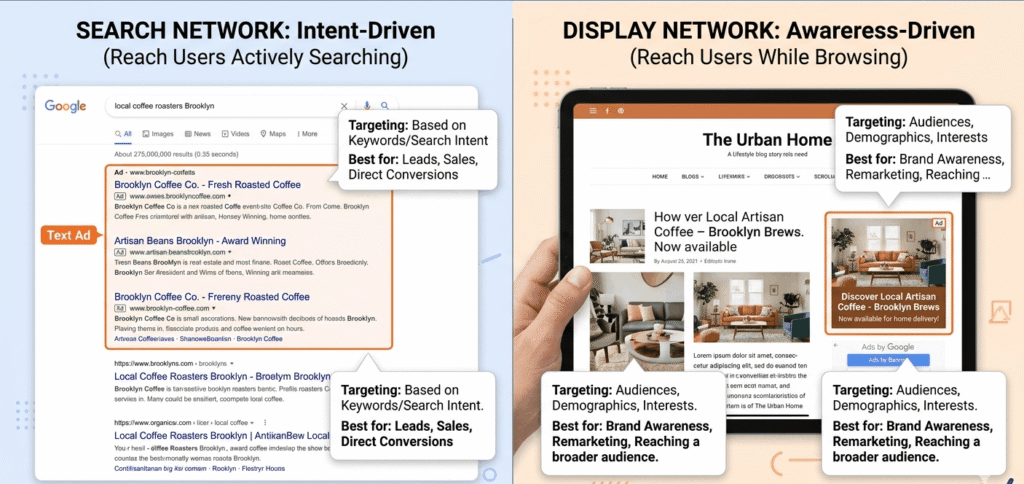
Conversely, the Display Network places visual banner ads across millions of partner websites, apps, and video platforms. When comparing search network vs display network performance for small budgets, the Display Network is best reserved for brand awareness or remarketing. It targets passive users who are browsing content rather than looking to buy, which often leads to lower conversion rates for transactional services.
Why is Google Ads Better Than Facebook Ads for Small Businesses?
Google Ads stands out because it targets active user intent, capturing prospects at the exact moment they are looking to buy a specific product or service. Facebook Ads relies on demographic and interest targeting, meaning you are interrupting a user’s social browsing experience to capture their attention.
While social media advertising is excellent for visual storytelling, brand building, and top-of-funnel discovery, Google Ads captures users at the very bottom of the purchasing funnel. For a small business with a limited budget, capturing immediate, high-intent search traffic offers a faster, more predictable path to a positive return on investment (ROI).
Step-by-Step Google Ads Campaign Setup for Beginners
Launching your first campaign can feel overwhelming, but breaking it down into structured phases ensures you skip the common pitfalls that drain ad spend. Before you write a single headline, remember that paid traffic works best when it feeds into a highly optimized sales process. If you haven’t mapped out your customer journey yet, take a moment to review our comprehensive guide on how to build a marketing funnel that converts.
Phase 1: Account Strategy and Setting the Foundation
When you sign up for Google Ads, the platform will steer you toward Smart Campaigns. While these simplified setups sound appealing, they limit your control over keyword match types, bidding, and negative keywords. Always opt for Expert Mode during account creation. This unlocks the full dashboard and gives you complete control over your budget.
Next, establish your core campaign settings:
- Campaign Type: Select “Search” to focus entirely on high-intent text ads.
- Networks: Uncheck the Search Partner Network and Display Network boxes for your initial launch. This keeps your ads strictly on core Google search results pages, saving your budget from unverified third-party traffic placements.
- Location Targeting: Never target an entire country if you only serve a specific region. Use the “Radius” or specific city/ZIP code targeting features to narrow your reach to your precise US service footprint. Under location options, change the target settings to “Presence: People in or regularly in your targeted locations” to avoid paying for clicks from people outside your area.
Phase 2: High-Intent Keyword Research
Effective keyword management is the foundation of any successful strategy centered around Google Ads for small business. Open the Google Keyword Planner inside your account to research what your ideal customers are searching for.
Instead of targeting broad, generic terms like “plumber” or “attorney,” focus on long-tail, high-intent phrases like “emergency plumber near me” or “local estate planning attorney.”
[Broad Match] 👉 plumbing services ❌ (Too vague, wastes budget)
“Phrase Match” 👉 “local plumber” ✅ (Balances volume and intent)
[Exact Match] 👉 [emergency plumber] ✅ (Highest intent, tight control)
Avoid using broad match keywords when starting out. Broad match gives Google the freedom to show your ad for any variation it deems relevant, which often results in paying for completely unrelated search terms. Stick to a combination of Phrase Match (using quotation marks, like “commercial roofing contractor”) and Exact Match (using brackets, like [best accounting firm in Chicago]) to maintain strict control over your ad spend.
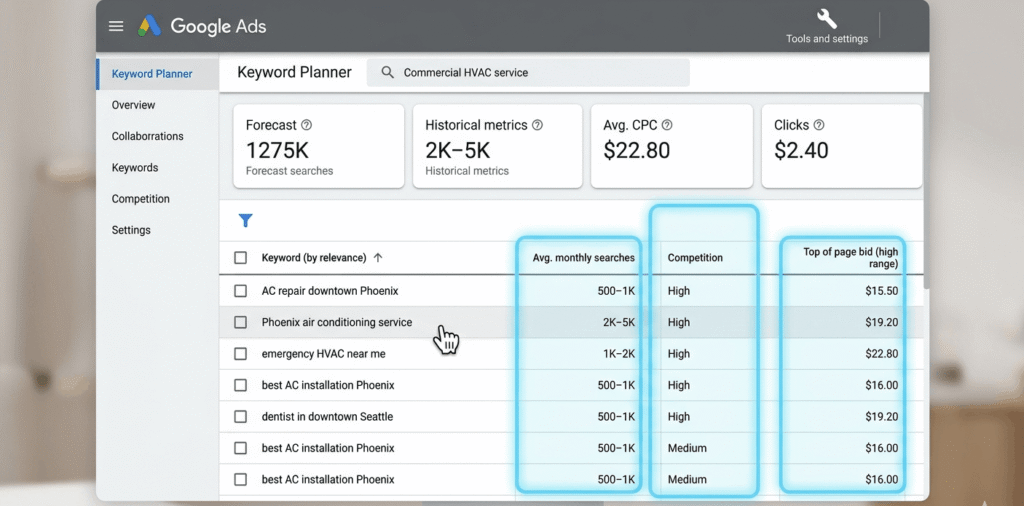
Phase 3: Writing High-Performing Ad Copy
Your text ads are the bridge between a user’s search query and your website. Google uses Responsive Search Ads (RSAs), which allow you to input up to 15 headlines and 4 descriptions. Google’s machine learning then mixes and matches these combinations to find the highest-performing variations.
To maximize your performance, write ads that directly address user intent:
- Mirror the Search Term: Include your core focus keywords directly in Headlines 1 and 2. If someone searches for “residential AC repair,” they should see that exact phrase in your headline.
- Highlight Local Trust and Benefits: Feature your unique selling propositions, such as “Licensed & Insured in Texas,” “Family-Owned Since 1998,” or “Free Inspections.”
- Use a Direct Call to Action: Tell the user exactly what to do next. Use clear phrases like “Call Now for an Estimate,” “Book Your Consultation Online,” or “Claim Your 10% Discount Today.”
Master the Technical Mechanics: Ad Rank and Quality Score
To keep your costs as low as possible, you need to understand how Google decides which ads get displayed at the top of the page. This ranking system is known as Ad Rank, and it is calculated using a combination of your maximum bid and your Quality Score.
Ad Rank = Maximum Bid × Quality Score
Your Quality Score is a metric from 1 to 10 that evaluates three key areas:
- Expected Click-Through Rate (CTR): The likelihood that a user will click your ad when it is shown.
- Ad Relevance: How closely your ad text matches the user’s search intent.
- Landing Page Experience: How helpful, fast, and easy to navigate your website is for visitors who click your ad.
A high Quality Score allows you to outrank competitors who are bidding significantly more money than you. By aligning your keywords, ad copy, and landing pages perfectly, you can lower your cost-per-click and secure premium ad placements without stretching your budget.
Setting Up Bulletproof Conversion Tracking
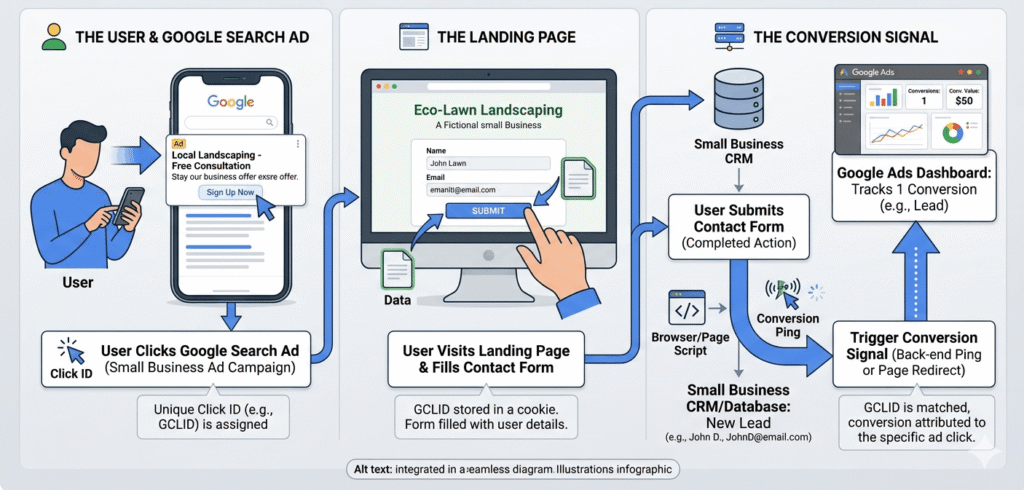
If you launch a campaign without tracking, you are essentially driving in the dark. Google Ads conversion tracking allows you to see exactly which keywords and ad variations generate revenue, and which ones are simply wasting money. To understand how this fits into your broader business metrics, explore our detailed breakdown on how to track your marketing ROI.
Step-by-Step Conversion Setup
To build a reliable data foundation, make sure you configure tracking for these essential conversion actions:
- Phone Call Tracking: Set up Google call forwarding to track clicks on your phone number directly from your ad extensions and website landing pages.
- Form Submissions: Track every time a visitor fills out a contact, quote, or booking form.
- Google Analytics 4 (GA4) Integration: Link your Google Ads account directly to GA4. This allows you to monitor post-click user behavior and analyze data alongside information from Google Search Console to get a complete view of your organic and paid performance.
Once your conversion tracking is active, you can safely transition to automated Smart Bidding strategies like “Maximize Conversions” or “Target CPA” (Cost Per Acquisition). These tools leverage Google’s machine learning algorithms to optimize your bids in real time, placing your ads in front of the users most likely to become paying customers.
3 Fatal Google Ads Mistakes That Drain Small Business Budgets
Many business owners lose money on their initial campaigns because of simple, preventable structural errors. Avoiding these three critical pitfalls can save you thousands of dollars in wasted ad spend.
1. Failing to Build a Comprehensive Negative Keyword List
Negative keywords are search terms you intentionally exclude from your campaigns. For example, if you are a premium roofing contractor, you want to add negative keywords like “free,” “cheap,” “jobs,” “training,” and “DIY.” Adding these exclusions ensures you never pay for clicks from users searching for services you don’t offer.
2. Sending Ad Traffic Directly to Your Homepage
Your website’s homepage is usually designed to give a general overview of your entire business. Sending paid ad traffic there forces visitors to hunt around for the specific service they searched for, which drastically lowers your conversion rates. Always send your traffic to a dedicated, high-converting landing page built specifically to match the intent of your ad groups.
3. Ignoring Search Terms Reports
Many business owners launch a campaign and don’t look at it again for weeks. Review your Search Terms report at least twice a week. This report reveals the exact phrases users typed into Google before clicking your ad. If you spot irrelevant queries, you can catch them early and add them to your negative keyword list before they drain more of your budget.
Scale Your Business Safely with Professional Management
Launching and managing a successful campaign centered around Google Ads for small business requires continuous monitoring, technical tracking adjustments, and strategic optimization. It’s completely normal to feel overwhelmed trying to handle your business operations while analyzing data, monitoring click prices, and adjusting keyword match types.
That is where we come in. Talatech is a premier digital marketing agency dedicated to helping local businesses across the US maximize their advertising performance. As certified Google Ads specialists, we build custom, high-converting paid search campaigns tailored to your specific service areas. We ensure your tracking is robust, your keyword strategy is sharp, and your budget is spent efficiently.
Ready to stop wasting money and start generating high-quality leads? For more insights into planning your overall budget, see our foundational Paid Digital Advertising Guide for US Small Businesses. Contact Talatech today to schedule your strategy session.
- 📍 Service Area: Serving businesses nationwide across the United States
- 💼 Expertise: Certified Google Ads Specialists
- 📅 Availability: Open Monday through Friday for new partner consultations
- 📞 Take Action: Contact Our Team Online or call us (940) 597-5872 directly to schedule your custom campaign review.
Frequently Asked Questions | Google Ads for Small Business
What is the difference between Google Ads Express (Smart Campaigns) and Expert Mode?
Google Ads Express (Smart Campaigns) is an automated, basic setup designed for quick deployment, but it hides critical search term data and strips away your control over match types and bidding strategy. Expert Mode gives you complete control over your campaign configuration, keyword match types, and negative keyword lists, allowing you to optimize your budget and stop wasted spend.
Can I run a successful Google Ads campaign with a budget of less than $500 per month?
While it is technically possible, a budget under $500 per month limits your ability to test and gather actionable data quickly, especially in competitive US markets. With a small budget, you must target a very narrow selection of exact match keywords and operate within a small geographic radius to ensure your budget isn’t spent entirely on a few clicks.
How do I check if my Google Ads are actually showing up?
Never search for your own business keywords on Google to see if your ads are running. Doing so creates artificial impressions, lowers your click-through rate, and can inflate your costs. Instead, use the Ad Preview and Diagnosis Tool inside your Google Ads dashboard to safely check your ad placements and see exactly how they appear to users in your target areas.
Available Mon-Fri / 9am-5pm EST | (940) 597-5872 | Contact Us Online | Google Business Profile